
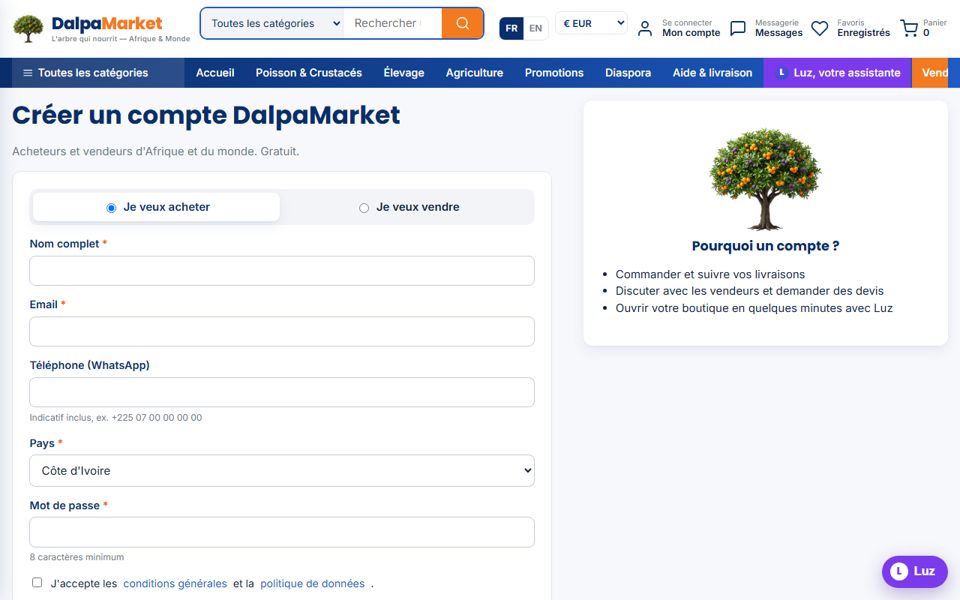
One account is enough to buy anywhere on DalpaMarket — and if you tick "I want to sell", your shop is created right away.
- 1Open the sign-up page
Click "Sign in" then "Create an account", or go straight to dalpamarket.com/compte/inscription.
- 2Choose your profile
"I want to buy" to order; "I want to sell" adds two fields (shop name, city) and opens your seller space immediately.
- 3Fill in your details
Name, email, WhatsApp phone with the country code (+225…), country — it sets your default currency (FCFA, euro or dollar) — and a password of at least 8 characters.
- 4Accept the terms and confirm
Your account is active straight away: no confirmation email to wait for.
- 5Set language and currency
At the top of every page: FR | EN for the language, and the FCFA / € / $ selector to display all prices in your currency.