
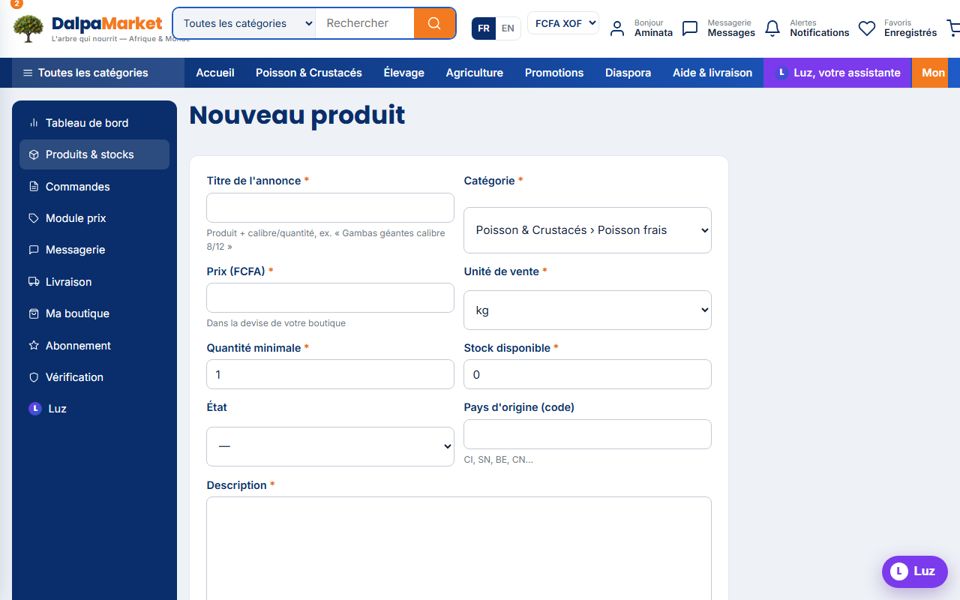
A good listing answers the buyer's questions in advance: origin, size grade, packaging, storage, minimum quantity. Luz takes care of it, you approve.
- 1Fill in the essentials
Title with size or quantity ("Giant prawns 8/12 grade"), precise category, price in your currency, selling unit (kg, box, tray, head…), minimum quantity and stock.
- 2Let Luz write
"Write the listing with Luz" button: optimised title, structured description and pre-filled attributes. Reread and adjust: you remain the author.
- 3Add a real photo
JPG/PNG up to 5 MB, well-lit product on a neutral background: a good photo doubles sales.
- 4Think of English speakers
"English version" block: "Translate with Luz" pre-fills the title and description in English — otherwise Luz translates automatically for English-speaking visitors.
- 5Publish
"Online" status: the listing is immediately visible, indexed for search (including semantic search) and SEO.