
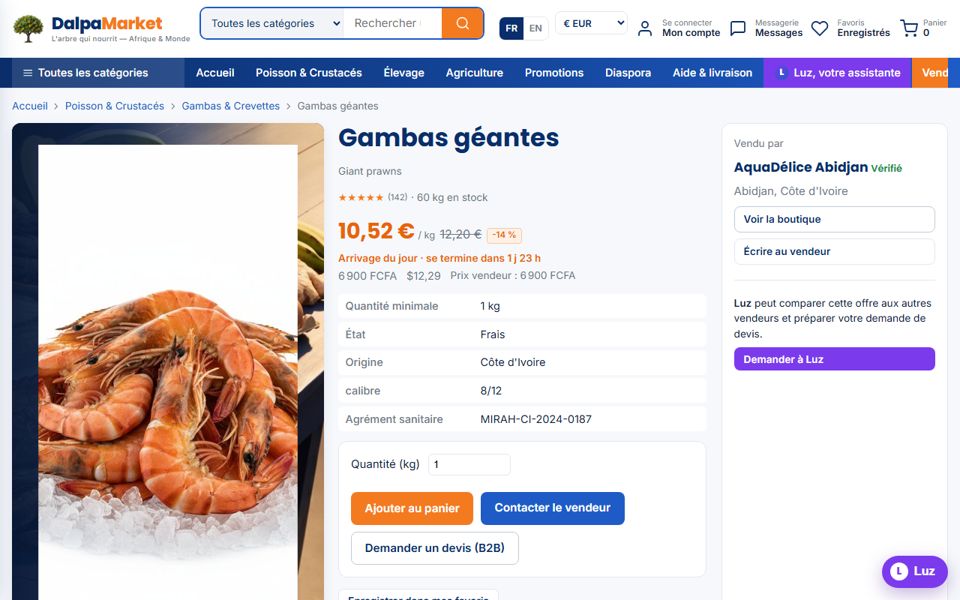
Every product page tells you everything: price in your currency, minimum quantity, condition, origin, the seller and their reviews. One order is created per seller, for crystal-clear tracking.
- 1Find the product
Search bar (it also understands meaning: "live shellfish for a restaurant" finds the lobsters), categories, or a sentence to Luz.
- 2Read the listing
Price per unit (kg, box, tray, head…), minimum quantity, stock, any discount with its end date, sanitary approval, reviews from delivered buyers.
- 3Add to cart or negotiate
"Add to cart" for the displayed price; "Contact the seller" or "Request a quote (B2B)" to discuss quantities and prices through messaging.
- 4Check the cart
Items are grouped by seller; adjust quantities, the total is displayed in your currency.
- 5Confirm the order
Delivery address, city and country: each seller's fees and lead times are shown before payment — free delivery above the threshold set by the seller.